Professional email, powered by OX App Suite
secure, branded, and built for business
Empower your business with a professional email solution built for productivity and trust. Powered by OX App Suite, it combines secure, ad-free email with seamless calendar, contacts, and document collaboration all under your own domain. Designed for businesses of every size, it delivers the reliability, privacy, and polish your brand deserves.
Active Mail Box
Countries Served
Customer Support
Guaranteed Uptime SLA
Years of Experience
Industries Served
*Hiya Emails is owned and operated by Hiya Digital Private Limited.
Get Professional Email Powered by OX App Suite
Empower your business with a professional email solution that combines reliable communication, powerful productivity tools, and enterprise-grade security. Powered by OX App Suite, our email hosting is designed for freelancers, startups, small businesses, and growing enterprises that need dependable performance and a professional online presence. Choose the plan that fits your business and enjoy secure email, integrated productivity applications, ample cloud storage, advanced spam and malware protection, and 24/7 expert support, all on a single, reliable platform.
OX App Suite
Ideal for professionals and businesses looking for secure, reliable business email with integrated collaboration tools.
- ✓10 GB Mailbox Storage
- ✓Full-Featured Webmail
- ✓Mobile & Desktop Access (IMAP)
- ✓Professional Email ([email protected])
- ✓Shared Calendars, Contacts & Tasks
- ✓CardDAV & CalDAV Support
- ✓Integrated Portal Page
- ✓Self-Service Migration Tool
- ✓Premium Anti-Virus & Anti-Spam
- ✓99.9% Uptime SLA
OX App Suite + Productivity
Everything in the OX App Suite plan, plus enhanced cloud storage and online productivity features.
- ✓Everything in OX App Suite
- ✓25 GB Mailbox Storage
- ✓25 GB Cloud File Storage
- ✓Online Office Suite
- ✓Create / Edit Word Docs
- ✓Create / Edit Spreadsheets
- ✓Create / Edit PowerPoint
- ✓99.9% Uptime SLA
Business Email Built for Ownership, A Business Identity
Your email address says a lot about your business before a single word is read. A generic inbox from a free provider quietly undermines the professional image you work hard to build. OX App Suite changes that give your team a fully branded communication platform where every email sent reinforces your company identity, not someone else’s.
Built on the open-source foundation of Open-Xchange, OX App Suite brings together business email hosting, shared calendars, contact management, cloud file storage, and real-time document collaboration into a single cohesive workspace. There is no juggling between disconnected tools, no separate subscriptions for productivity apps, and no compromise on security. Everything your team needs to communicate, coordinate, and deliver work is available from a single, intuitive platform accessible from any device, anywhere in the world.
The most common reason organizations contact us is not a technical failure; it is a people problem: an employee leaves and takes email history with them, or a shared inbox becomes inaccessible because only one person knew the password. OX App Suite is built to remove both risks before they happen, with centralized admin controls, shared mailboxes, and audit-logged access that give businesses ownership of their communications, not just access to them.

Why Choose OX App Suite for Business Email?
The market for business email solutions is crowded, but most options either lack depth or demand a steep learning curve. OX App Suite occupies a different position it delivers enterprise-grade capability without the enterprise-grade complexity, and it does so in a way that actually fits how modern teams work.

Professional Email That Builds Trust
A custom domain email address, [email protected], is one of the lowest-cost, highest-impact investments a business can make. Clients, vendors, and partners notice. Businesses with custom domain email are consistently rated as more credible in buyer trust surveys, a low-cost signal that pays off at every first impression.
With OX App Suite, setting up professional email addresses across your entire team is straightforward, and domain-based branding is central to the platform rather than an afterthought.
Beyond appearances, a custom domain email gives your business ownership and control. You are not dependent on a third-party brand, and your communications remain associated with your company identity regardless of how the platform evolves.

Secure Business Email Hosting
Most businesses end up using four or five different tools to cover what OX App Suite handles in one place. Email, calendar scheduling, contact management, task tracking, document editing, and cloud storage are each standalone product categories. OX App Suite integrates them into a unified workspace, reducing context switching, eliminating duplicate data entry, and giving your team a single source of truth for day-to-day operations.
This integration is not superficial. The calendar connects directly to contacts, shared tasks link to team members, and files attach seamlessly to emails without uploading through a separate interface. It functions the way a connected business actually operates.

Affordable Open-Xchange Business Email
OX App Suite is designed to scale with your business, right from the ground up. Whether you’re a freelancer just starting with a single mailbox or an enterprise team with hundreds of users, everyone has access to the same core capabilities. There’s no watered-down version for smaller teams and no separate product line for bigger ones, just one consistent platform built to grow with you.
As your organization expands, the platform expands effortlessly. Add users, expand storage, and unlock advanced collaboration features, all without the hassle of migrating to a different platform. Instead of forcing you to adapt to rigid tiers or plan around future limitations, the architecture flexes around your needs, growing exactly when and how you do.
What Is Included with OX App Suite?
OX App Suite is a genuinely comprehensive platform. Below is a breakdown of what is included and why each capability matters for day-to-day business operations.
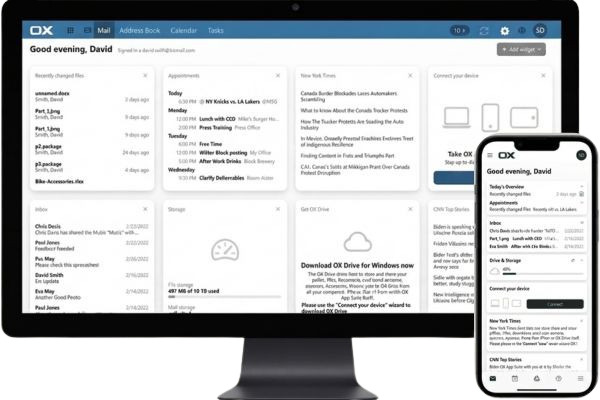
Professional Email Hosting
The email layer of OX App Suite is built for reliability and configurability. It supports the full range of protocols businesses need: IMAP, POP3, and SMTP, so your team can access mailboxes through virtually any mail client. For organizations with specific routing needs, features like email forwarding, auto-responders, and custom filtering rules provide granular control without requiring IT expertise.
- Custom domain email addresses for your entire team
- Webmail access from any browser, no software required
- IMAP, POP3, and SMTP support for desktop and mobile clients
- Email forwarding and intelligent auto-responders
- Professional email signatures and branded templates
- Customizable inbox filters and rules for automated sorting
- Shared mailboxes for departmental communication
Calendar & Scheduling
Managing schedules across a team without a shared calendar is an exercise in frustration. OX App Suite provides personal and shared calendars that integrate directly with your contact list, enabling meeting invitations, appointment tracking, and team scheduling without leaving the platform. iCal compatibility ensures that external participants using other calendar applications can participate without friction.
- Personal and shared team calendars with permission controls
- Meeting scheduling with availability visibility
- Appointment management and recurring event support
- iCal compatibility for cross-platform scheduling
Contacts Management
- Centralized address books accessible organization-wide
- Shared contacts with role-based access controls
- Global address lists for enterprise deployments
- Contact synchronization across devices and clients
Tasks & Productivity
Email inboxes were never meant to serve as task managers. OX App Suite separates communication from action items, providing a dedicated task layer where individual to-dos and team deliverables live side by side. Project collaboration tools allow team leads to assign work, track progress, and maintain accountability without relying on a separate project management subscription.
- Personal task lists with priority and due date settings
- Team task tracking with assignee visibility
- Project collaboration tools to coordinate cross-functional work
Cloud File Storage
Emailing documents back and forth creates version-control nightmares and unnecessarily fills inboxes. OX App Suite includes secure cloud storage that keeps your business files organized, accessible, and shareable without relying on external file-sharing services. Files sync automatically across devices, so your team always works from the most current version.
- Secure cloud storage with organized folder structures
- Flexible file sharing with permission management
- Cloud access from any connected device
- Automatic file synchronization to keep teams current
Online Document Editing
The ability to create, edit, and collaborate on documents directly within the platform removes one of the most common friction points in team workflows: software compatibility. OX App Suite includes a built-in document editor that handles word processing, spreadsheets, and presentations without requiring your team to install any desktop software. Multiple collaborators can work simultaneously, with changes reflected in real time.
This is particularly valuable for distributed teams, remote workers, and organizations that operate across multiple office locations.
- Word processing documents, drafts, proposals, and reports
- Spreadsheets for data analysis, budgeting, and planning
- Presentations for client-facing and internal communication
How OX App Suite Works Day-to-Day
Every tool your team uses to communicate, schedule, share files, and deliver work lives inside a single platform, no switching between apps, no duplicate logins, no version conflicts from emailing documents back and forth. Here is what that looks like in practice.
One dashboard for everything that matters
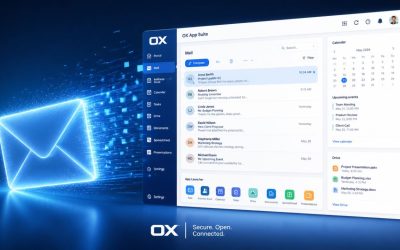
When you open OX App Suite, your entire workday is visible from a single screen: incoming emails with sender and subject preview, the day’s meetings and calendar events, outstanding tasks with priority flags, and recently accessed files. Most productivity tools require you to open four separate applications to get this overview. OX App Suite brings it all together in one place, so your team spends less time managing tools and more time doing actual work.
Smart email organization that keeps up with volume
High email volume managed manually is neither sustainable nor effective. OX App Suite lets you define rules that automatically separate newsletters, internal communications, client emails, and automated notifications. So your attention stays on messages that genuinely require a response, not on manually sorting an inbox.
AI that handles the drafting, not just the sending
OX App Suite’s AI assistant runs on Open-Xchange’s own infrastructure using self-hosted language model components. No email content is transmitted to OpenAI, Google, Anthropic, or any external AI API. For organizations with strict data residency requirements, this architecture means AI-assisted drafting remains within the same environment as your stored email.
Collaboration without the coordination overhead
When email, scheduling, and file management are in the same workspace, collaboration no longer requires coordination overhead. Team members share calendars so availability is always visible. Files can be attached directly from OX Drive without re-uploading. Contacts stay synchronized so no one works from an outdated directory. The time it takes to move from a conversation to a decision drops measurably.
Full access from any device, anywhere
The complete OX App Suite experience is available through any modern web browser, with no software installation required, and the same interface whether you are at a desk, in a client meeting, or working remotely. The mobile interface is purpose-built for touch interaction, not a stripped-down version of the desktop, giving field staff and traveling professionals the same functionality they have in the office.
Built to be used from day one
A platform that takes weeks to learn does not deliver value quickly. OX App Suite is designed around interface conventions most business users already know, which means onboarding time is short, training overhead is low, and your team reaches full productivity faster than with tools that require dedicated IT deployment.
Enterprise-Grade Security & Privacy
For any business, email is a critical security surface. It is the entry point for phishing attacks, the conduit for sensitive contractual communications, and the system most vulnerable to unauthorized access. OX App Suite is built with this reality in mind, incorporating security controls that protect organizations without creating barriers to productivity.
Advanced Spam & Virus Protection
Phishing campaigns now convincingly mimic legitimate correspondence, and malware often hides in routine attachments. OX App Suite counters this with multi-layer server-side filtering, DNS blocklists, heuristic scanning, and Bayesian analysis that detect and quarantine threats before they reach inboxes. All attachments are scanned for known malware signatures, cutting security exposure and easing the reactive burden on IT teams.
Secure Data Transmission
Every email is automatically protected in transit with TLS 1.3 and at rest with AES-256, ensuring communications are secure at every stage. Running on ISO 27001-certified infrastructure with GDPR data residency support where applicable, OX App Suite safeguards proposals, contracts, and financial records. Since encryption is enabled by default rather than requiring manual setup, organizations get consistent protection while minimizing the risk of human error.
Privacy-Focused Architecture
Data sovereignty matters: emails, calendars, contacts, and documents hold valuable, confidential business intelligence. OX App Suite uses a privacy-respecting architecture that keeps data under your control, a clear departure from consumer-grade free email services, which often monetize user data through advertising and behavioral profiling. With OX App Suite, your business communications remain your business, not a product.
Reliable Infrastructure
Security means little without reliability, so OX App Suite pairs both with a 99.9% uptime SLA and geographically redundant infrastructure. A single node failure won’t disrupt delivery or availability, and built-in scalability sustains performance under high demand, keeping teams reliably connected to essential email and collaboration tools, so business continuity is never left to chance.
Access OX App Suite from Any Device
Flexibility in how your team accesses their work environment is no longer a differentiator; it is an expectation. OX App Suite meets that expectation with broad, consistent device support across all major platforms and client types.
Web Browser Access
The full OX App Suite experience is available through any modern web browser, with no extensions, plugins, or software installations required. This is particularly useful for users working on shared devices, IT administrators managing deployments, or team members accessing their workspace from a client location. The browser interface mirrors the full desktop experience in both functionality and performance.
Mobile Access
Mobile access in OX App Suite is not a stripped-down version of the platform. The mobile interface is purpose-built for smaller screens and touch interaction, giving users full access to email, calendar, contacts, tasks, and files from their iOS or Android device. For teams with field staff, traveling professionals, or remote workers, this mobile capability ensures that the workday does not pause when someone steps away from their desk.
- iPhone and iPad native iOS browser and app compatibility
- Android smartphones and tablets
Desktop Email Client Compatibility
Many professionals prefer the experience of a dedicated desktop email client, and OX App Suite is fully compatible with the most widely used options. Using standard IMAP/SMTP protocols, you can connect your OX App Suite mailbox to your preferred client without any special configuration or proprietary connectors.
- Microsoft Outlook provides full synchronization of email, calendar, and contacts
- Apple Mail on macOS and iOS
- Mozilla Thunderbird for cross-platform desktop access
- Gmail clients and other IMAP-compatible applications
Compare OX App Suite vs Common Business Email Alternatives
Free email platforms were built for individuals, not organizations. When a business tries to operate on a consumer-grade service, the gaps show up fast: there is no way to enforce two-factor authentication across your team, no audit trail when an employee account is compromised, no retention policy when legal hold is required, and no admin oversight when someone leaves the company. The comparison below highlights the features that distinguish a professional communication platform from a free inbox.
| Feature | OX App Suite | Free Email Services | Why It Matters |
|---|---|---|---|
| Custom domain email | Yes, full support for [email protected] across every team member. | Limited; provider branding stays on every address (e.g., @gmail.com) regardless of your business name. | A custom domain is the baseline credibility signal clients and partners judge before reading a single word of your email. |
| Team and user administration | Yes, centralized admin panel with role-based permissions, shared mailboxes, and global address lists. | No; every account is independent with no central oversight, no offboarding controls, and no shared directory. | Without admin controls, there is no way to revoke access when an employee leaves or restrict what each user can see and do. |
| Two-factor authentication (2FA) | Yes, 2FA is available across all accounts and enforceable organization-wide by administrators. | Limited to optional on some free services, but cannot be mandated or enforced centrally by an admin. | Admin-enforced 2FA is a baseline requirement for cyber insurance eligibility and most business compliance frameworks. |
| Business-grade security controls | Yes, TLS 1.3 in transit, AES-256 at rest, multi-layer spam and malware filtering, ISO 27001-certified infrastructure. | Limited basic spam filtering only; no compliance-grade encryption controls or admin-level security policies. | Free services were built for personal use; business communications require security controls that can be audited, enforced, and documented. |
| Admin audit logs | Yes, full administrator access to login history, permission changes, and account activity across the organization. | No audit trail of any kind; no visibility into who accessed what account or when. | Audit logs are required for GDPR accountability and are the first thing requested during any security incident investigation. |
| Email archiving and retention policies | Yes, configurable retention rules to meet legal hold and compliance requirements. | No; emails are retained or deleted based on storage limits, not business rules or legal requirements. | Finance, legal, and healthcare organizations are legally required to retain business email for defined periods; free services offer no mechanism to enforce this. |
| Data portability and export | Yes, full export of emails, contacts, and calendar data in standard formats at any time, with no restrictions. | Limited export tools vary by provider; some restrict bulk data export entirely or make it difficult to complete without manual workarounds. | Your business data should leave with you if you switch platforms; being unable to export it cleanly is an operational and legal risk. |
| Professional support with SLA | Yes, dedicated business support with guaranteed response times; enterprise plans include dedicated onboarding specialists. | No; community forums or self-service help only, with no guaranteed response time and no escalation path. | Every hour of email downtime without a support SLA is an hour your business operates blind, with no recourse and no timeline for resolution. |
| Email alias support | Yes, create and manage multiple aliases (info@, sales@, support@) routed to one or multiple mailboxes from a single admin panel. | Limited to typically one address per account; aliases require workarounds, separate accounts, or are unavailable entirely. | Aliases let a small team present the departmental structure of a larger organization without the overhead of managing separate inboxes. |
| Uptime guarantee (SLA-backed) | Yes, 99.9% uptime SLA backed by geographically redundant infrastructure serving over one million users. | No; free services offer no uptime commitment, no compensation for outages, and no infrastructure transparency. | A business with no uptime guarantee has no recourse when its email goes down during a client negotiation, a product launch, or a compliance deadline. |
The differences in the table above are not about appearances; they are about operational control. A business that cannot enforce 2FA organization-wide is exposed. A team without audit logs has no visibility into what goes wrong. An organization with no email retention policy is non-compliant in most regulated industries. And a company whose data cannot be exported is hostage to its email provider. OX App Suite was built to give businesses the controls, guarantees, and infrastructure that free services were never designed to provide.
Professional Business Email Powered by OX App Suite
Power Your Business with Professional Email That Works Anywhere
Create a lasting first impression with a secure, professional email address powered by OX App Suite. Access your email, calendar, contacts, files, and productivity tools from any device while enjoying reliable performance and enterprise-grade security.
Open-Xchange Ideal for Every Business Type
OX App Suite is not a one-size-fits-all product in the sense of forcing compromises it is one platform that genuinely serves different organizational profiles by scaling capabilities to match actual needs.

Freelancers & Consultants
Independent professionals live and die by their reputation, and first impressions matter enormously in a competitive market. A branded email address on your own domain is one of the clearest signals that you operate as a serious, established business rather than a casual side project. OX App Suite gives freelancers and consultants access to the same communication infrastructure as larger organizations, at a scale that fits a one or two-person operation. Separate your business correspondence from personal email, present a consistent, professional identity to clients, and manage your schedule and contacts in a single, organized workspace.

Small Businesses
For small businesses, operational efficiency directly affects bottom-line performance. Every tool that reduces duplication, improves coordination, or eliminates unnecessary back-and-forth pays for itself. OX App Suite gives small-business teams a shared communication and productivity environment where email, scheduling, file sharing, and task management all happen in one place. The administrative overhead is low, the setup is fast, and the day-to-day experience is designed to get out of your team’s way rather than create additional complexity.

Growing Companies
Growth creates its own challenges. A team of five communicates very differently from a team of fifty, and the tools that worked at launch often begin to show their limitations as headcount and operational complexity increase. OX App Suite is designed to scale with you, adding users, expanding storage, enabling advanced collaboration features, and supporting additional administrative controls as your organization’s needs evolve. You will not find yourself migrating platforms mid-growth because the tool you are on no longer fits.

Enterprises
Large organizations have requirements that go well beyond what basic email hosting can provide. Advanced administrative controls, role-based access management, shared mailbox provisioning, global address list management, and robust security policies are all standard in OX App Suite. IT teams gain the visibility and control they need to manage a large deployment, while end users benefit from the same intuitive experience available to teams of any size. OX App Suite scales horizontally across thousands of users without sacrificing performance, manageability, or security.
OX App Suite Migration Made Easy
Switching business communication platforms is a significant operational decision, and the migration process is often the primary concern that holds organizations back from adopting a better solution. OX App Suite addresses this directly with a structured migration path that minimizes disruption and gives your team the support it needs to transition confidently.
Import Existing Emails, Contacts & Calendars
Preserving historical communication data is essential for maintaining business continuity, and OX App Suite makes the transition seamless with direct migration support for Gmail, Google Workspace, and Microsoft 365. Its built-in migration wizard securely transfers emails, contacts, and calendar events while preserving folder structures, timestamps, and other important data. For larger enterprise deployments, a dedicated onboarding specialist helps manage the migration with zero planned downtime, ensuring your team moves to the new platform with their complete communication history intact and without needing to maintain parallel access to legacy systems.
Seamless Setup Assistance
Technical setup should not be a barrier to getting started. Migration guidance covers every element of the transition, not just data import, but the full configuration process from end to end.
- Email migration from your existing provider
- DNS and domain configuration for custom email addresses
- Mail client setup for Outlook, Apple Mail, and Thunderbird
- Mobile device synchronization across iOS and Android
Minimal Business Disruption
Most migrations for teams with fewer than 50 users are completed within 2–4 hours of setup, with email delivery uninterrupted throughout. Here is what the process looks like:
- Add and verify your domain (15–30 minutes)
- Run the migration wizard to import email, contacts, and calendar from Gmail or Microsoft 365 (30–90 minutes depending on mailbox size)
- Update your DNS MX records to route new mail to OX App Suite (propagation: up to 24 hours, but usually under 2)
- Configure mail clients and mobile devices (15 minutes per user with our setup guides)
During DNS propagation, both your old and new mailboxes receive mail simultaneously; nothing is lost.
About Open-Xchange Email Hosting Infrastructure
Hiya Digital has been delivering business email solutions since 2005, supporting more than 1,800 businesses and over 5,500 active mailboxes worldwide. As an authorized reseller of Professional Business Email powered by OX App Suite, we combine our managed deployment, migration, and technical expertise with OX App Suite’s enterprise-grade cloud infrastructure.
The platform is hosted in highly secure, geographically redundant data centers designed for high availability, continuous monitoring, and reliable performance. OX App Suite deployments are backed by infrastructure certified to ISO 27001 and, where applicable, support GDPR data residency and compliance requirements.
OX App Suite’s engineering team manages every aspect of your email environment, including domain configuration, DNS, mailbox provisioning, migration, spam protection, monitoring, security, and ongoing technical support, enabling your business to benefit from a secure, professionally managed email platform without the complexity of in-house maintenance.
For enterprise inquiries, migration scoping, or questions about regulated-industry compliance, contact our expert support team directly.
Why Businesses Choose OX App Suite
The decision to adopt a business communication platform is not just about features; it is about finding a solution you can grow with, trust for security, and rely on to support how your team actually works.
OX App Suite is the strongest fit for businesses that want a single, self-contained communication platform and value data control over deep integration with a specific third-party ecosystem. If your team is already heavily invested in Microsoft 365 or Google Workspace and relies on platform-specific tools like Teams or Google Meet, a migration may require additional planning. Our team can help you assess fit before you commit.
The reasons organizations choose OX App Suite come down to a consistent set of operational advantages:
- Centralized communication and collaboration: one platform replaces multiple tools
- Professional business identity reinforced through every email sent
- Productivity tools included calendars, tasks, document editing, and storage
- Flexible scalability from solo operators to enterprise deployments
- Privacy-focused infrastructure where your data remains under your control
- Consistent experience across mobile, desktop, and web environments
- Secure cloud storage fully integrated with the broader workspace
- Business-grade support from professionals who understand operational requirements

Our customer testimonials from across the world.
Get Started with OX App Suite Professional Email Today
Your business deserves a communication platform that reflects the professionalism of your work, supports the way your team operates, and grows with you as your organization evolves. OX App Suite delivers on all three, combining professional email hosting with productivity applications, cloud storage, collaboration tools, and enterprise-grade security in a single, unified platform built for modern business.
A branded email address on your own domain is one of the clearest initial signals of credibility in a business relationship and the foundation on which OX App Suite is built. The platform removes the fragmentation that holds businesses back and replaces it with a workspace that actually works.
Ready to elevate your business communication? Set up OX App Suite professional email today and give your team the tools they need to operate at their best.
Related Blogs

OX App Suite vs Microsoft 365 Business
Compare OX App Suite vs Microsoft 365 Business across email, collaboration, security, productivity, administration, and deployment features for businesses.

OX App Suite vs IceWarp
Compare OX App Suite vs IceWarp across email, collaboration, security, deployment, productivity, and admin features to find the best business solution.

OX App Suite vs Zoho Mail: Which Email Service Wins
Compare OX App Suite and Zoho Mail on storage, security, admin controls, and migration options to choose the right business email platform for your team.

OX App Suite vs Google Workspace: Which Is Better?
Compare OX App Suite and Google Workspace on features, admin controls, migration options, and collaboration tools to find the best email suite for your team.

OX App Suite For E-Commerce: Benefits & Setup Explained
See how OX App Suite email helps online stores cut spam, protect orders, and keep support teams synced, plus a practical DNS and migration setup guide.

Why Your Domain Needs OX App Suite Professional Email
See how OX App Suite turns your business domain into a secure email platform with spam filtering, shared calendars, document collaboration, and mobile access.

Startups Choose OX App Suite Professional Email Hosting
OX App Suite gives startups custom-domain email, built-in security, and team collaboration tools. See why growing companies choose it over free webmail.
Top OX App Suite Professional Email Features to Know
Explore the 10 core OX App Suite email features, including security, mobile sync, encryption, and migration, to evaluate the right fit for your business.

OX App Suite vs Traditional Webmail: Key Differences
Compare OX App Suite and traditional webmail on security, collaboration, storage, and migration to see why businesses are moving away from free inboxes.

OX App Suite Professional Email Renewal & Upgrade Steps
Learn how to renew and upgrade your OX App Suite Professional Email with this step-by-step guide to ensure uninterrupted service and enhanced features.
OX App Suite Professional Email Hosting Plans & Pricing
See OX App Suite business email plans, pricing ranges, and core features to compare hosting options before choosing the right provider for your company.

OX App Suite Professional Email: Good for Freelancers
OX App Suite email gives freelancers custom-domain business email, OX Guard encryption, and OX Drive storage. Compare pricing, security, and migration options.

OX App Suite Mobile App: Setup For IOS & Android Devices
Configure the OX App Suite mobile app on iOS and Android with step-by-step setup, push notifications, calendar sync, security, and troubleshooting guidance.

OX App Suite Email Security: What’s Included and Not
See exactly what OX App Suite email security includes, SPF, DKIM, DMARC, OX Guard, 2FA, backups, where protection gaps remain, and what requires extra setup.

OX App Suite Email Hosting: Good for Small Businesses
OX App Suite email hosting explained for small businesses: pricing, migration, security, setup, and support details from Hiya Digital, an Authorized Partner.

OX App Suite Calendar & Collaboration Tools Overview
See how OX App Suite handles shared calendars, contacts, document collaboration, mobile sync, and permissions for modern business teams across devices.
Migrate Business Email to OX App Suite Without Downtime
Migrate your business email to OX App Suite without downtime. DNS sequencing, mailbox sync, and security steps from an Authorized OX Partner for IT teams.

Create Professional Email Addresses with OX App Suite
Learn how to create professional email addresses with OX App Suite, domain verification, DNS setup, mailbox provisioning, security, and migration steps.

OX App Suite Professional Email Boosts Productivity
See how OX App Suite professional email streamlines team scheduling, files, and security, so teams spend less time managing inboxes and more time working.

OX App Suite Storage Plans: How Much You Really Need
Explore OX App Suite storage plans, mailbox quotas, Drive capacity, storage pooling, and expert guidance to choose the right plan from an Authorized Partner.
Frequently Asked Questions About Professional Email – OX AppSuite
What is OX App Suite Professional Email?
OX App Suite is a hosted business communication platform that combines email, calendar, contacts, file storage, and document editing under a single login. Unlike standalone email services, it is designed so that all these tools share the same data. For example, a meeting invitation sent by email automatically appears in your OX Calendar, and files attached from OX Drive do not need to be re-uploaded. It runs entirely in a browser, with no software to install, and supports IMAP/SMTP connections to Outlook, Apple Mail, and Thunderbird.
How is OX App Suite different from free email services?
Free email services are mainly designed for personal use, while OX App Suite is built for businesses. It lets you use your own domain name, share calendars and contacts with your team, store files, and work together on documents. This helps businesses look more professional and stay organized.
Can I use my own domain name with OX App Suite?
Yes. OX App Suite allows you to create email addresses that match your business domain name. For example, instead of a generic email address, you can use addresses such as [email protected] or [email protected], which helps build trust with customers.
What tools come with OX App Suite besides email?
OX App Suite includes email, calendars, contacts, tasks, cloud file storage, and online applications for creating documents, spreadsheets, and presentations. These tools work together within a single platform, making daily work easier and more organized.
Can I use Outlook or other email programs with OX App Suite?
Yes. OX App Suite supports standard email protocols, allowing you to connect your mailbox to popular email programs. This means you can continue using the email application you already know while benefiting from OX App Suite features.
Can multiple people work together in OX App Suite?
Yes. Team members can share calendars, contacts, files, and documents. This makes it easier to plan meetings, work on projects, and keep everyone updated without sending endless back-and-forth emails.
Can I create and edit documents online?
Yes. OX App Suite includes online tools for creating and editing text documents, spreadsheets, and presentations directly in your browser. This means you do not always need to install separate office software on your computer.
Is OX App Suite easy for beginners to use?
Yes. OX App Suite is designed with a familiar and user-friendly interface. Most users can quickly learn to send emails, manage calendars, and use productivity tools without extensive training or technical knowledge.
Does OX App Suite include task management tools?
Yes. OX App Suite includes task management features that help users create to-do lists, track work, and organize responsibilities. Tasks can also be connected to emails and calendar events, making it easier to manage projects and deadlines.
Is my data secure in OX App Suite?
Yes. Here is what that means in practice:
- In transit: All email is encrypted with TLS 1.3 between your device and our servers, and between servers where the receiving mail server supports it.
- At rest: Stored data uses AES-256 encryption. Encryption keys are managed by [https://openexc.com/] and are not accessible to third parties.
- Access control: Administrators can set role-based permissions, restrict user access to shared mailboxes, and audit login activity from the admin panel.
- No advertising: Your email content is never scanned for advertising purposes.
- Data residency: EU-based organizations can request storage within EU infrastructure. A GDPR-compliant Data Processing Agreement is available on request.
Does OX App Suite support teamwork across different locations?
Yes. Since OX App Suite stores files, calendars, contacts, and documents online, team members can work together from different cities, offices, or even countries. Everyone can access shared information and collaborate in real time.
Does OX App Suite use artificial intelligence (AI)?
How does OX App Suite pricing compare to Microsoft 365 Business Basic and Google Workspace Starter?
What happens to my email during the migration? Will there be any downtime?
Can I enforce two-factor authentication across my entire team, not just individual accounts?
How is OX App Suite's AI assistant different from using ChatGPT or Copilot for email?
What mail clients and protocols does OX App Suite support for desktop access?
What administrative controls are available for managing a team?
Is OX App Suite suitable for regulated industries such as legal, healthcare administration, or financial services?
How many email addresses or aliases can I create per account?
Can I keep my existing email address when I switch to OX App Suite?
What happens to my data if I cancel?
Do you have a mobile app?
OX App Suite is fully accessible through the mobile browser on iOS and Android with no installation required. A native iOS and Android app is also available [https://apps.apple.com/us/app/ox-drive-by-open-xchange/id1585939206] / [https://play.google.com/store/apps/dev?id=8399655292500008089] providing full access to email, calendar, contacts, and files optimized for touch.
Glossary
New to business email terminology? The definitions below explain the technical terms used throughout this page and will help you evaluate any email hosting provider, not just ours.
- IMAP
The Internet Message Access Protocol lets you read and manage emails stored on a mail server from any device without permanently downloading them. - POP3
Post Office Protocol 3 downloads emails from the server to a single device and typically removes them from the server afterward. - SMTP
Simple Mail Transfer Protocol is the standard method for sending outgoing emails from a mail client to a mail server or between servers. - TLS 1.3
Transport Layer Security version 1.3 is the current gold standard for encrypting data while it travels between your device and a server, preventing interception. - AES-256
Advanced Encryption Standard with a 256-bit key is a military-grade encryption method used to protect data stored on disk, making it unreadable without the correct key. - Two-factor authentication (2FA)
A login method requiring a second proof of identity (such as a one-time code) in addition to a password, making unauthorized access much harder. - ISO 27001
An internationally recognized certification confirming that an organization’s information security management systems meet rigorous, audited standards. - GDPR
General Data Protection Regulation (GDPR) is EU law that governs how organizations collect, store, and process personal data of people in the European Union. - Spam filtering
Automated detection of unsolicited or malicious emails using techniques like DNS blocklists, heuristic rules, and pattern analysis before they reach your inbox. - Phishing
A cyberattack where fraudulent emails impersonate trusted senders to trick recipients into revealing passwords, financial details, or other sensitive information. - Malware
Malicious software is any program designed to damage, disrupt, or gain unauthorized access to a system, often delivered via email attachments. - Audit log
A tamper-evident record of who accessed what, when, and what changes were made is essential for compliance investigations and security reviews. - Role-based access control
A permission system where what each user can see or do is determined by their assigned role (e.g., admin, editor, viewer), rather than individual settings. - Shared mailbox
An email inbox that multiple team members can access and reply from (e.g., [email protected]), without anyone needing to share a personal password. - Email alias
An additional email address (e.g., [email protected]) that routes messages to an existing mailbox, letting one person receive mail from several addresses. - MX record
Mail Exchange records a DNS setting that tells the internet which server should receive emails for your domain. Updating it redirects your mail to a new provider. - DNS
The Domain Name System, the internet’s phonebook, translates human-readable domain names (e.g., yourcompany.com) into the numeric addresses that servers use to communicate. - Uptime SLA
Service Level Agreement for uptime: a contractual guarantee specifying the minimum percentage of time (e.g., 99.9%) the service will be available, with compensation if the guarantee is breached. - Geographically redundant infrastructure
Servers are located in multiple physical data centers so that if one location fails, another automatically takes over with no service interruption. - Data residency
The requirement that data is stored and processed only within a specified country or region, often mandated by local privacy laws. - iCal
iCalendar is an open file format (.ics) for sharing calendar events and meeting invitations between different calendar applications and platforms. - Exchange ActiveSync
A Microsoft protocol that synchronizes email, calendar, and contacts in real time between a mail server and desktop or mobile clients like Outlook. - Open-source
Software whose source code is publicly available for anyone to inspect, modify, and build upon the foundation OX App Suite is built on. - Cloud storage
Files are stored on remote servers accessible over the internet rather than on a local hard drive, enabling access from any device and automatic syncing. - Real-time collaboration
The ability for multiple people to edit the same document simultaneously, with each person’s changes appearing instantly for all other contributors. - Version control
A system that tracks changes to files over time, ensuring everyone works from the latest copy and previous versions can be recovered if needed. - Migration wizard
A guided, automated tool that moves emails, contacts, and calendar data from one platform to another while preserving folder structures and timestamps. - AI writing assistant
A built-in AI tool that helps draft email replies, suggest subject lines, and summarize long email threads, all processed within the platform’s own infrastructure. - Language model
An AI system trained on large amounts of text that can generate, summarize, or continue written content is the technology powering email drafting assistants. - Data sovereignty
The principle that a business’s data is subject only to its own control and the laws of the country where it is stored, not those of a third-party vendor. - Legal hold
A process that preserves all relevant emails and records in anticipation of litigation or a regulatory audit, preventing deletion during the hold period. - Bayesian analysis
A statistical filtering technique used in spam detection that learns from patterns in known spam and legitimate email to accurately classify new messages. - DNS blocklist
A real-time database of IP addresses and domains known to send spam or host malware, used by mail servers to reject suspicious incoming connections.