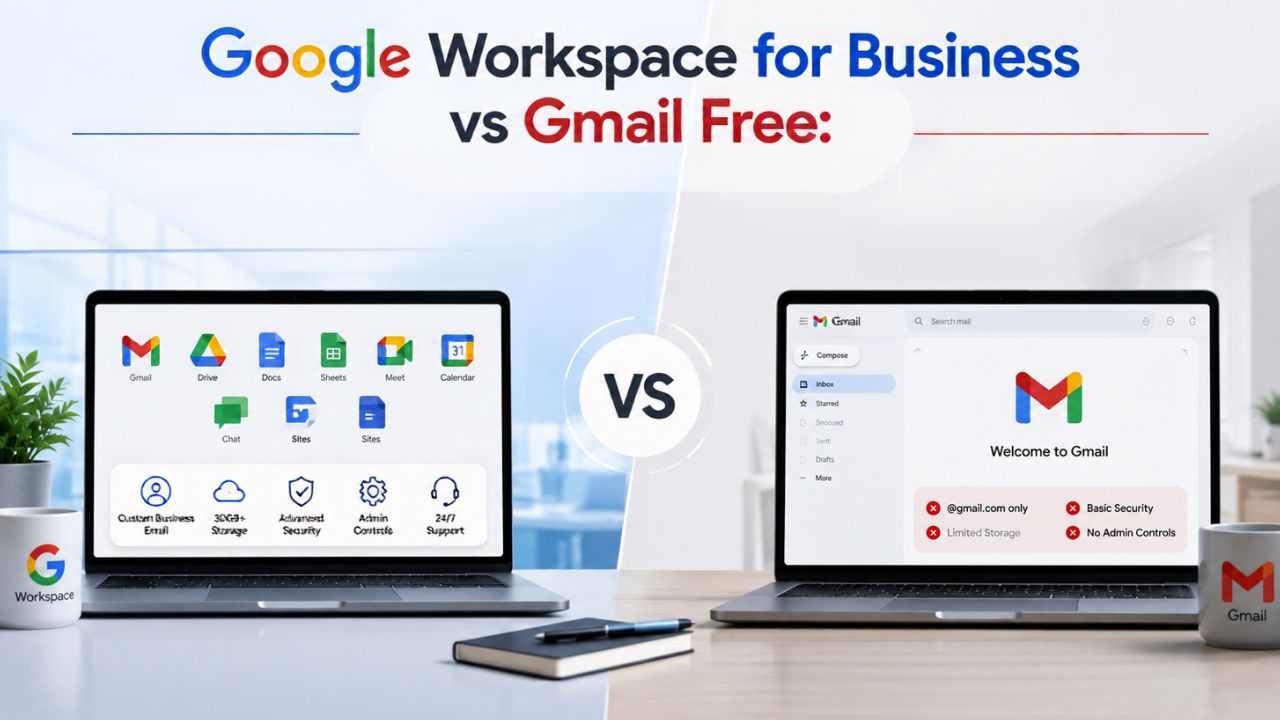
Free Gmail feels like a business tool because it runs the same interface, but it was built for individuals, not companies. The two side by side: domain email, admin control, storage, and support, so you can see exactly where free Gmail runs out and what the paid upgrade actually buys you.
Why Free Gmail Stops Working the Moment You’re a Business
A free Gmail account was designed for one person managing one inbox, not a company with employees, clients, and shared responsibilities. The moment a second person needs access to company email, a shared calendar, or a consistent file system, the cracks in a personal account start to show, regardless of how polished the interface looks.
 The Credibility Problem With @gmail.com Addresses
 The Credibility Problem With @gmail.com Addresses
A business emailing clients from a “[email protected]” address is quietly telling every recipient that the company hasn’t yet invested in its own infrastructure. It’s a small signal, but it compounds: invoices, proposals, and contract follow-ups sent from a free address get scrutinized differently than the same message sent from a [email protected] domain. Buyers, especially in B2B contexts, treat domain email as a baseline trust marker, not a nice-to-have.
This isn’t just about appearances. A generic Gmail address can’t be verified against a company’s actual domain, which makes it easier to spoof and harder for recipients’ spam filters to trust consistently. Vendors, banks, and larger clients often have procurement or security checklists that specifically flag free consumer email domains as a risk factor before a contract is signed, which can slow down or outright block deals that would otherwise close quickly.
Where Free Tools Quietly Cap Your Growth
Free Gmail was never designed to scale past a single user, and that shows up in ways business owners don’t notice until they hit the wall. There’s no way to create department-wide distribution groups, no shared team calendar visibility by default, and no built-in way to hand off an employee’s inbox when they leave the company. Every one of these gaps gets more expensive to fix retroactively than to avoid from the start.
The growth ceiling also shows up operationally. A business relying on personal Gmail accounts for three, five, or ten employees ends up with a patchwork of separate inboxes, separate Drives, and no single place to manage it all. Adding a new hire means creating yet another disconnected account rather than provisioning a managed user within a single system, a difference that becomes painfully obvious the first time someone needs to be added or removed under time pressure.
The Custom Domain Email Gap in Free Gmail
Domain-based email is arguably the single most visible difference between free Gmail and a paid business account, and it’s the one most small business owners notice first. This section covers what a domain address actually does for a business and what setting one up through Google Workspace involves in practice.
What a Business Domain Address Actually Signals
Email addressed from your own domain, [email protected], tells recipients that the company owns and controls its own infrastructure, not that it’s borrowing Google’s free consumer product. That signal matters most in first-contact moments: a cold outreach email, a first invoice, a first proposal. Recipients form an impression of legitimacy before they’ve read a single word of the message body, based purely on the sending domain.
Domain email also unlocks things a personal Gmail account structurally can’t offer. You can create role-based addresses like sales@ or support@ that survive employee turnover, set up consistent naming conventions across the whole team, and route mail through your own domain’s authentication records (SPF, DKIM, DMARC) to improve deliverability. None of this is available to a personal @gmail.com account, because the domain itself belongs to Google, not to the business using it.
Setting Up Domain Email Without Losing Your Gmail Habits
The practical upgrade path keeps the Gmail interface people already know while changing what sits behind it. Google Workspace uses the same Gmail web and mobile apps, the same inbox layout, and the same search and labeling system employees are already comfortable with; the difference is that mail now flows through a domain the business owns and controls, verified through DNS records added at the domain registrar.
What Actually Changes During Setup
The setup work itself is DNS-level, not interface-level: adding MX records to point mail delivery at Google’s servers, verifying domain ownership, and creating user accounts under the new domain. None of this requires touching how anyone actually writes or reads email day to day. For a small business without an in-house IT person, this DNS step is usually where self-serve signups stall; it’s technical enough to intimidate a non-technical owner, but not complex enough to justify hiring a full-time administrator to do it once.
Admin Control Free Gmail Doesn’t Give You
Free Gmail has no concept of an “organization”; every account is an island, managed only by its owner. A central admin console actually adds value, and its absence poses a real operational risk as a business scales.
No Central Console Means No Real Oversight
A personal Gmail account has no owner above the individual user. There’s no dashboard showing who has access to what, no way to enforce a password policy across the team, and no way to view login activity for multiple employee accounts in one place. If five employees each use a personal Gmail account for company email, the business has, in effect, outsourced its own account security to five separate individuals with five separate sets of habits.
Google Workspace replaces that with a single Admin Console that gives one designated person, usually the owner or office manager, visibility and control across every user in the organization. That includes enforcing two-step verification, setting password strength requirements, managing which third-party apps can access company data, and reviewing security alerts in one place instead of chasing five separate account owners for the same information after something has already gone wrong.
Offboarding a Free Gmail User Is Basically Impossible
When an employee with a personal Gmail account leaves, the business has no clean way to reclaim that inbox, its contacts, or the files stored in that person’s personal Drive. The account belongs to the individual, not the company, which means client emails, shared documents, and calendar history can walk out the door along with the departing employee, sometimes permanently.
With Workspace, the account itself belongs to the business’s domain, so an admin can suspend or delete the user, transfer their Drive files and email to another employee, and revoke device access in a matter of minutes. This single capability is often the one that convinces small business owners fastest: it’s not a hypothetical risk, it’s the exact scenario that plays out every time staff turnover happens on free personal accounts, and it’s one of the clearest gaps in the “no admin controls” argument for staying on free Gmail.
Storage Limits That Choke a Growing Business
Storage is one of the most concrete, measurable differences between free Gmail and a paid Workspace plan, and it’s a number worth stating precisely rather than waving at. This section breaks down exactly how the free tier’s storage works and how it compares once a business upgrades.
The 15 GB Ceiling and What Fills It First
Every free Google Account, according to Google’s own support documentation, includes up to 15 GB of storage shared across Gmail, Google Drive, and Google Photos combined, not 15 GB for each service separately. That single pool absorbs email attachments, uploaded Drive files, and any original-quality photo backups, which means a business account can hit its limit well before the inbox itself feels full. (Google Mail Help)
Once that 15 GB pool is exhausted, the consequences aren’t cosmetic; the business account can no longer send or receive email, upload new Drive files, or back up new photos until space is freed or the account is upgraded. For a business exchanging attachments, contracts, and design files daily, this ceiling is usually reached faster than owners expect, particularly once a shared Drive full of proposals, contracts, and marketing assets starts accumulating across a growing team.
Pooled Storage vs Per-Person Limits at Scale
Google Workspace’s paid tiers replace that single 15 GB personal pool with per-user allocations that scale with the business. Business Starter includes 30 GB of pooled storage per user, Business Standard raises that to 2 TB per user, and Business Plus and Enterprise editions extend it to 5 TB per user, all pooled and shareable across the organization rather than locked to one individual’s account. (Google Workspace Pricing)
The practical difference shows up as a team grows. A five-person team on Business Standard is working with a combined pool in the terabyte range rather than splitting a single 15 GB free allotment across five separate personal accounts that don’t share space at all. That distinction, pooled, business-owned storage versus fragmented personal quotas, is often the single largest capacity gap between free Gmail and even the entry-level paid tier.
Security and Compliance: Free Gmail Was Never Built For
Security is where the gap between free and paid Gmail becomes least visible day-to-day and most costly if something goes wrong. This section covers what free Gmail lacks in enforceable security policy and why that absence starts to matter the moment a business handles client data.
Two-Factor Enforcement and Device Management Gaps
 Two-Factor Enforcement and Device Management Gaps
A personal Gmail account can turn on two-step verification voluntarily, but nothing forces it, and nothing lets a business owner confirm that every employee actually has it. There’s also no way to remotely wipe company data from a lost or stolen phone, no way to require device screen locks before mail syncs, and no visibility into which devices are currently signed into which accounts.
Google Workspace’s Admin Console lets an owner mandate two-step verification organization-wide, enforce mobile device management policies, and remotely wipe a company account from a lost device without needing the employee’s cooperation or even their physical presence. For a small business without dedicated IT staff, this is the difference between security being a personal choice made by each employee and security being a policy the business actually controls.
Why Regulated Clients Ask About Data Controls
Businesses working with clients in finance, healthcare, or legal services increasingly get asked, sometimes as a formal vendor questionnaire, whether they can produce email records on request, retain data for a defined period, or place a legal hold on specific accounts. Free Gmail has no mechanism for any of this; the data lives entirely under the individual account holder’s control, with no organizational retention or discovery capability layered on top.
Google Vault, available as an add-on to Business Starter and Standard and included in Business Plus, gives a business the ability to retain, search, and export email and Drive content across the organization for legal or compliance purposes. Even businesses that aren’t formally regulated increasingly find that larger clients won’t sign a contract without some assurance that this kind of data governance is in place on the vendor’s side.
| Capability | Free Gmail (Personal) | Business Starter | Business Standard |
|---|---|---|---|
| Email domain | Shared @gmail.com | Custom @yourdomain.com | Custom @yourdomain.com |
| Pooled storage | 15 GB, shared with Drive & Photos | 30 GB per user | 2 TB per user |
| Central admin console | None | Included | Included |
| Meet group call length | 60 minutes (3+ participants) | Up to 24 hours | Up to 24 hours |
| Meet participant cap | 100 | 100 | 150 |
| Meeting recording | Not available | Not available | Included |
| Enforced 2-step verification | Optional, per-user | Admin-enforced org-wide | Admin-enforced org-wide |
| Service-level uptime commitment | None published | Published SLA | Published SLA |
Get Your Security and Compliance Setup Done Right
Storage and security aren’t abstract line items; they’re the two gaps that most often force a mid-year, mid-panic migration when a free account suddenly locks up or a departing employee takes client data with them. Hiya Digital, as an Authorized Reseller and Implementation & Migration Partner for Google Workspace, sets up domain verification, admin policies, and storage allocation correctly the first time, so a small business owner isn’t troubleshooting DNS records or security settings alone.

Support and Service Guarantees You Lose With Free Gmail
When something breaks on a free Gmail account, the business is on its own; there’s no contract promising a response time and no dedicated line to call. This section covers what that absence actually means in practice and what a paid plan replaces it with.
No SLA Means No Recourse When Email Goes Down
Free Gmail comes with no service-level agreement. If the account is locked, flagged, or simply inaccessible for hours, there’s no published commitment from Google about resolution time, and no channel dedicated to resolving it quickly for a business depending on that inbox for client communication and invoicing.
Google Workspace’s paid editions come with a published SLA and access to Google’s business support channels, which matters most in exactly the moment a business can least afford downtime, the day an invoice needs to go out, a contract needs signing, or a client is waiting on a time-sensitive reply. The SLA doesn’t guarantee zero outages, but it does put a defined commitment behind resolution, which a free consumer account doesn’t offer at any price.
Community Forums vs Direct Business Support
Free Gmail users troubleshooting a problem are generally routed to public help center articles and community forums, where answers come from other users rather than Google staff, and response time is entirely unpredictable. There’s no ticket number, no case escalation path, and no way to reach a live person if the community answer doesn’t solve the issue.
Paid Workspace plans include access to actual support channels- phone, chat, or email depending on the tier- staffed by Google, with defined response-time targets that scale by plan level. For a business owner without an internal IT contact, this is often the practical difference between resolving an email outage in an hour versus losing half a day reading forum threads that may not even apply to the specific issue at hand.
What You Actually Gain on Day One With Google Workspace
The upgrade isn’t only about closing gaps; it also adds tools a free account never had access to at all. What appears immediately after a business account is provisioned.
Shared Calendars, Drive, and Meet Built for Teams
 Shared Calendars, Drive, and Meet Built for Teams
Free Gmail’s calendar, Drive, and Meet all function as personal tools first; sharing exists, but it’s manual and per-file rather than built around an organization. Workspace turns these into genuinely shared infrastructure: team calendars with visible availability across the whole company, Shared Drives that belong to the business rather than to whichever employee uploaded a file first, and Meet rooms that automatically carry the organization’s branding and security policy.
Shared Drives specifically solve a problem that free Gmail users constantly run into without realizing it’s a structural limitation: files uploaded to a personal Drive stay tied to that person’s account, so if they leave, reorganize their folders, or forget to share a subfolder, the business loses access. A Shared Drive belongs to the organization itself, meaning file access survives staff turnover and reorganization by design, not by someone remembering to update sharing permissions.
AI Features That Free Gmail Doesn’t Include
Every paid Google Workspace business tier includes Gemini AI assistance in Gmail for drafting and summarizing messages, with fuller Gemini access across Docs, Sheets, Slides, and Meet available starting at Business Standard. Free personal Gmail accounts have historically received a lighter, more limited version of these AI writing tools than those built into paid business tiers.
For a small business, this shows up in daily tasks rather than headline features: drafting a client follow-up faster, summarizing a long email thread before a meeting, or getting a first-pass outline for a proposal directly inside Docs. It’s not a reason to upgrade on its own, but it’s a meaningful part of what a business gains immediately that a personal account was never going to offer at the same depth.
Cost Reality: Weighing Free Against a Paid Upgrade
“Free” is only free until the business starts absorbing costs the free tier doesn’t show on any invoice. This section frames the actual cost trade-off without citing exact monetary figures that vary by promotion, currency, and commitment length.
What “Free” Actually Costs a Growing Business
The real cost of staying on free Gmail is rarely visible in a single line item; it shows up as time spent manually granting Drive access, hours lost when an account locks up with no support line to call, and the occasional lost deal because a prospect’s procurement team flagged the sending domain. None of that appears on a budget spreadsheet, which is exactly why it gets underestimated until it’s already caused a problem.
Paid Workspace plans carry a predictable per-user monthly cost that scales with headcount, billed either on a flexible month-to-month basis or a lower annual-commitment rate. The trade-off is straightforward: a small, predictable subscription cost in exchange for removing the unpredictable costs, lost time, lost deals, and lost data on offboarding that free Gmail carries silently. For most small businesses past the one- or two-person stage, that trade tips in favor of upgrading well before it feels urgent.
Matching Plan Tiers to Team Size and Needs
Not every business needs the top tier to close the free-to-paid gap; the entry-level Business Starter plan already includes domain email, the admin console, and enforced security policy, which covers the core reasons most small businesses upgrade in the first place. Storage, meeting length, and recording are where the tiers diverge, not the fundamental admin and domain controls that Starter already provides.
The decision point is usually storage and meeting needs rather than headcount alone. A business exchanging large files daily, running client-facing recorded calls, or needing eDiscovery for compliance reasons will outgrow Starter quickly regardless of how few employees it has, while a lean two- or three-person consultancy may run comfortably on Starter for years. Matching the tier to actual usage patterns, not just team size, avoids both overpaying and hitting a wall six months in.
Migration Path: Moving From Free Gmail Without Losing Anything
Switching from personal Gmail accounts to a managed business domain is a one-time project, not a permanent disruption, provided it’s sequenced correctly. This section covers what actually happens during the move and how to avoid the most common self-serve mistakes.
What Transfers Automatically and What Needs Planning
Email history, contacts, and Drive files from an existing personal Gmail account can be migrated into a new Workspace account using Google’s built-in data migration tools, which pull historical mail directly from the old inbox into the new domain-based one. This isn’t a manual copy-paste job; it’s a structured transfer designed specifically for exactly this free-to-paid switch.
What doesn’t transfer automatically is anything tied to how the business actually operates: shared calendar invites sent from the old address, saved logins on services that used the old Gmail address for account recovery, and any automated workflows built around the old email. These require a manual audit before the switch, not after, since discovering a missed dependency after the old account is deactivated is far more disruptive than catching it during planning.
Timing the Switch to Avoid Business Disruption
 Timing the Switch to Avoid Business Disruption
The most common mistake small businesses make during a self-serve migration is switching mid-week during an active client engagement, which means any missed forwarding rule or delayed DNS propagation lands directly in the middle of active business communication. DNS changes for domain verification can take anywhere from a few minutes to about 48 hours to fully propagate, depending on the domain registrar, which is a detail worth planning around rather than discovering during a live migration.
A cleaner sequence runs the old and new accounts in parallel for a short overlap window, forwarding mail from the old address to the new one while contacts and calendar invites gradually update, rather than a hard cutover on a single day. For a business owner managing this alone without in-house IT, that overlap window is usually the single factor that determines whether the migration is invisible to clients or visibly disruptive to them.
Choosing the Right Starting Tier for Your Upgrade
The upgrade decision isn’t just “should we move”; it’s “which tier do we start on”, and getting that second decision wrong means either overpaying immediately or migrating again within a year. This section covers the signals that point toward each tier.
Signs You’re Ready to Move Beyond Business Starter
A business is outgrowing Business Starter’s 30 GB per-user storage allocation when file-sharing conversations start revolving around “who has room” rather than “who needs access.” Similarly, the lack of meeting recording on Starter becomes a real limitation the first time a client call needs to be referenced later, or a training session needs to be reused for onboarding future hires.
The clearest signal is usually Shared Drives becoming a daily habit rather than an occasional one, once a team is regularly collaborating on documents that need to survive individual account turnover. Business Standard’s larger pooled storage and full Gemini access across Docs, Sheets, and Meet tend to justify the incremental per-user cost quickly, particularly for teams in the 10-to-100-person range that do regular day-to-day collaboration.
Questions to Answer Before You Commit
Before committing to a tier, a small business owner should be able to answer three concrete questions: how much shared storage the team actually uses today (not projected usage, actual usage), whether client-facing calls need to be recorded or retained for any reason, and whether any current or prospective client has ever asked about data retention, legal hold, or compliance documentation.
If the answer to the storage question is “we don’t know,” that alone is a signal to start with Business Starter and monitor actual consumption rather than guessing and overpaying for Plus-tier storage that may never get used. If the compliance question comes back “yes, at least once,” that’s usually enough to justify Business Plus’s Vault and eDiscovery inclusion outright, rather than adding Vault as a separate add-on to a lower tier later.
Which Upgrade Tier Fits Your Team
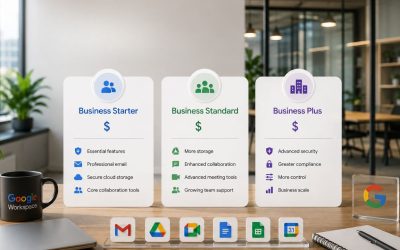
| Plan | Storage per User | Meet Participants | Meeting Recording | Best Fit |
|---|---|---|---|---|
| Business Starter | 30 GB | 100 | Not included | Solo operators and very small teams needing domain email and basic admin control |
| Business Standard | 2 TB | 150 | Included | Teams of roughly 10–100 doing regular shared-document and video collaboration |
| Business Plus | 5 TB | 500 | Included, with attendance tracking | Teams needing Vault, eDiscovery, or advanced device management |
| Enterprise | Unlimited | 1,000 | Included, plus DLP controls | Organizations exceeding 300 users or with formal compliance mandates |
Frequently Asked Questions
What is Google Workspace for business?
Google Workspace for business is the paid upgrade from free personal Gmail, built specifically for organizations rather than individuals. It replaces a personal @gmail.com address with custom domain email ([email protected]), adds a central Admin Console for managing every employee account from one place, and includes business-grade storage, security policy enforcement, and published support commitments that free Gmail doesn’t offer. It runs on the same Gmail, Drive, Calendar, and Meet interfaces employees already know, so the switch changes what lies behind the tools rather than how people use them day-to-day. Plans start at Business Starter and scale up through Standard, Plus, and Enterprise based on storage, meeting capacity, and compliance needs. For a small business, it’s best understood not as a different product from Gmail, but as the organizational layer wrapped around the same familiar tools.
Is Google Workspace free for businesses?
No, Google Workspace is a paid subscription, priced per user per month, with no permanently free business tier for standard commercial use. Google does offer a time-limited free trial period on its paid plans, giving a business roughly two weeks to test the Admin Console, domain email setup, and storage before committing. There is a separate, genuinely free Workspace edition available specifically to registered nonprofits approved through the Google for Nonprofits program, which is not available to standard commercial businesses. Outside the trial and the nonprofit program, businesses using Gmail without payment are using the personal, individual account version of Gmail, which lacks the domain email, admin controls, and storage allocations that define the actual Workspace product.
Does Google Workspace include Gmail for business?
Yes, Gmail is the core email application included in every Google Workspace plan, from Business Starter through Enterprise. Still, it runs on the business’s own domain rather than a shared @gmail.com address. The interface is functionally identical to personal Gmail, so employees don’t need retraining. Still, the underlying account is provisioned and managed through the company’s Admin Console rather than being an independent personal account. This also means company email becomes an asset the business owns and can transfer between employees, rather than something tied permanently to whichever individual set up the account. Every Workspace tier bundles Gmail alongside Drive, Calendar, Meet, Docs, Sheets, and Slides as one integrated subscription, rather than selling business email as a standalone product.
How much does Google Workspace for business cost compared to staying on free Gmail?
Free Gmail carries no subscription cost, but Google Workspace’s Business Starter, Standard, and Plus tiers are priced per user per month, with lower rates available on an annual commitment versus flexible month-to-month billing. Exact current pricing varies by region, currency, and active promotions, so it’s worth confirming live rates on Google’s official pricing page before budgeting rather than relying on a fixed figure. The more useful comparison isn’t the subscription line item in isolation; it’s that line item against the hidden costs of free Gmail: lost productivity from manual file-sharing, no support line during an outage, and the risk of losing access to company data when an employee using a personal account leaves.
How many users can Google Workspace support on one account?
Business Starter, Standard, and Plus plans can each be purchased for up to 300 users on a single account, which comfortably covers the vast majority of small and mid-sized businesses. Once an organization exceeds 300 users, it needs to move to an Enterprise plan, which has no published maximum user limit and is priced through a custom quote negotiated directly with Google’s sales team rather than listed publicly. For context, free personal Gmail accounts have no concept of a shared “organization” at all; each account is entirely independent, with no upper or lower bound, because there’s no organizational structure linking them together in the first place.
Can I migrate my existing emails, contacts, and files from free Gmail to Google Workspace?
Yes, Google provides built-in data migration tools specifically designed to pull historical email, contacts, and Drive files from an existing personal Gmail account into a new Workspace account. This is a structured transfer process rather than a manual export-and-reimport job, and it’s designed to preserve message history and folder structure during the move. What it doesn’t automatically handle is anything tied to business operations built around the old address, saved account-recovery emails on other services, calendar invites already sent from the old address, and any automation rules configured under the old account, all of which should be audited and updated manually as part of the migration plan, not discovered after the old account is deactivated.
Is Google Workspace more secure than free Gmail for a small business?
Yes, primarily because of enforceability rather than any difference in Google’s underlying infrastructure. Free Gmail lets an individual user turn on two-step verification voluntarily. Still, a business has no way to confirm every employee has done so, and no way to remotely wipe a lost device or revoke access when someone leaves. Google Workspace’s Admin Console lets a business owner mandate two-step verification organization-wide, enforce mobile device policies, and immediately suspend or wipe an account the moment an employee departs, turning security from an individual habit into an enforceable company policy, which is the actual gap that matters for a business handling client data.
What’s the difference between Google Workspace Business plans and Enterprise?
Business Starter, Standard, and Plus are the self-serve, publicly priced tiers designed for organizations with up to 300 users, differentiated primarily by storage, meeting participant caps, and compliance features such as Vault and eDiscovery. Enterprise removes the 300-user ceiling entirely, adds unlimited storage, data loss prevention controls, and deeper enterprise-grade security management, but is priced through a custom, sales-led negotiation rather than a published monthly rate. For most small businesses covered by this comparison, the relevant decision sits entirely within the Business tiers; Enterprise typically only becomes relevant once headcount or compliance requirements outgrow what Plus can support.
Can I keep my existing Gmail address after upgrading to Google Workspace?
Not in the sense of keeping the same free @gmail.com address as your primary business email; Workspace is built around a custom domain, so the point of upgrading is moving away from the shared Gmail domain entirely. However, the transition doesn’t have to be abrupt: many businesses set up mail forwarding from the old personal Gmail address to the new domain-based account for a transition period, so messages sent to the old address during the switch still reach the right inbox while contacts and clients gradually update to the new address. This overlap approach avoids a hard cutover that risks missed messages during the switch.
Does upgrading to Google Workspace mean I lose the free storage I already have on Google One?
No, Google One personal storage subscriptions and Google Workspace business storage are separate allocations tied to different account types, so upgrading a business to Workspace doesn’t affect any personal Google One plan an individual employee separately maintains on their own personal account. What it does mean is that files and email tied to the old personal Gmail account need to be actively migrated into the new Workspace account, since the two remain distinct storage pools rather than merging automatically. Planning the migration around this distinction avoids the common mistake of assuming personal and business storage combine on their own.
Glossary
Admin Console: The central management dashboard included with every Google Workspace plan, used to create and manage user accounts, enforce security policies, and control organization-wide settings from one place.
DNS (Domain Name System) records: Technical settings configured at a domain registrar that direct where email and web traffic for a domain should be routed; verifying domain ownership and setting up MX records for email are both done through DNS.
Google Vault: A retention, search, and eDiscovery tool for email and Drive content, included with Business Plus and available as an add-on for Starter and Standard, used mainly for legal hold and compliance requirements.
MX records: A specific type of DNS record that tells the internet which mail servers should receive email for a domain; adding Google’s MX records is the core technical step in setting up domain-based business email.
Pooled storage: A shared storage allocation across every user in a Google Workspace organization, rather than a fixed individual quota, meaning unused storage from one user’s account is available to the rest of the team.
SLA (Service-Level Agreement): A published commitment from Google guaranteeing a defined level of service uptime and support responsiveness, included with paid Workspace plans and absent from free personal Gmail accounts.
Shared Drive: A Workspace-only Drive space owned by the organization rather than an individual user, meaning files remain accessible to the team even after the employee who uploaded them leaves the company.
The Hiya Digital Team is a collective of IT infrastructure specialist engineers, certified systems administrators, and cloud architects driven by a singular mission: building corporate communication systems that just work. As an Authorized Google Partner, the team handles complex global hosting deployments, secure email migrations, and advanced data compliance architectures for businesses across 40+ countries.
With over two decades of technical experience spanning custom premium business email configurations, OX AppSuite deployments, and enterprise-level network security, the Hiya Digital Team writes to demystify domain infrastructure. Their content focuses on actionable technical strategies, anti-phishing security protocols, and seamless cloud collaboration setup, all backed by real-world deployment experience and 24/7 technical support accountability.