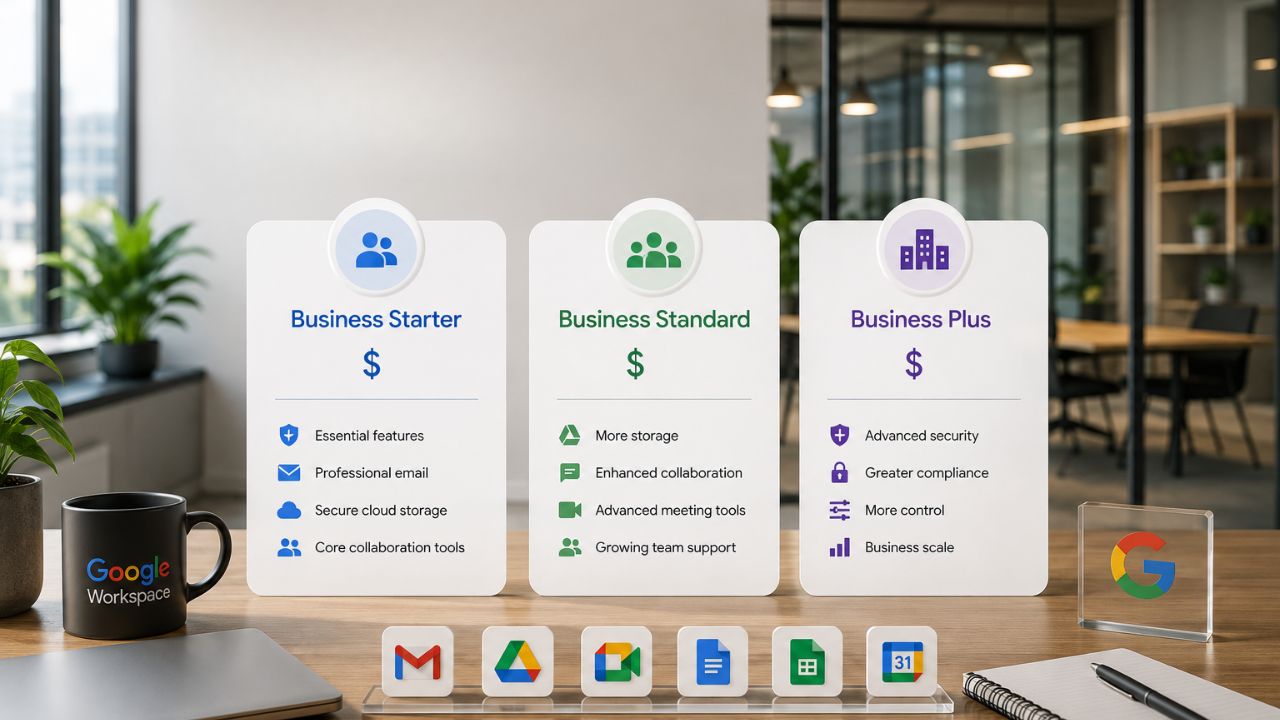
Choosing the right Google Workspace Business plan requires looking beyond the basic feature list to understand how each tier supports your organization’s day-to-day operations and future growth. Business Starter, Business Standard, and Business Plus differ in cloud storage, meeting capabilities, collaboration tools, security features, and administrative controls. Comparing these differences helps businesses select a plan that matches their current requirements while providing enough flexibility to scale as their needs evolve.
Storage: 30 GB, 2 TB, and 5 TB Explained for Real Teams
Storage is the single biggest jump between tiers, and it is also the one small business owners most often misjudge. Business Starter includes 30 GB of pooled storage per user, Business Standard includes 2 TB, and Business Plus includes 5 TB, all shared across Gmail, Drive, and Photos rather than allocated in silos.
 Pooled Storage vs Individual Quotas: Why the Math Changes at Scale
 Pooled Storage vs Individual Quotas: Why the Math Changes at Scale
Google Workspace storage is pooled, meaning the organization’s total allowance is shared across every licensed user rather than locked to individual accounts. Business Starter includes 30 GB of pooled storage per user, Business Standard includes 2 TB per user, and Business Plus and Enterprise Plus both include 5 TB per user, with the ability to request additional capacity on Plus and Enterprise. For a five-person Starter team, that means a combined pool of 150 GB across the organization, not five separate 30 GB buckets, each locked to a person.
That pooling matters most once usage across a team gets uneven. A designer uploading large image files and a bookkeeper storing mostly spreadsheets draw from the same pool on Standard or Plus, so one heavy user doesn’t force an upgrade for everyone. On Starter, the same imbalance shows up faster because the total pool is so much smaller; a handful of large attachments or a few months of Drive backups can eat into the shared allowance for the whole team, not just one mailbox. Owners comparing tiers should think in terms of total organizational storage, not per-seat storage, when deciding how far 30 GB will actually stretch.
When 30 GB Runs Out and What Fills It First
Storage on Starter fills from three directions at once: Gmail attachments, Drive uploads, and Google Photos backups, all drawing from the same 30 GB pool per user. Email is usually the quiet culprit; years of invoices, signed contracts, and marketing assets sent as attachments accumulate without anyone noticing until Gmail starts throwing warnings about incoming mail being blocked.
Once a user hits their storage ceiling on a Starter plan, new emails stop arriving and file uploads to Drive fail, which for a small business often means missed client replies at the worst possible moment. The fix isn’t always an upgrade; cleaning out large attachments, converting uploaded Word and Excel files into native Google Docs and Sheets format, and moving old project archives to external cold storage can buy meaningful headroom without changing plans. But these are manual, recurring chores that someone has to own, and most small teams without dedicated IT don’t get around to them until the warning banners start appearing.
Feature-by-Feature Spec Table: Starter vs Standard vs Plus vs Enterprise
| Spec | Business Starter | Business Standard | Business Plus | Enterprise |
|---|---|---|---|---|
| Pooled storage per user | 30 GB | 2 TB | 5 TB | 5 TB, more on request |
| Max Meet participants | 100 | 150 | 500 | 1,000 |
| Meeting length (max) | 24 hours | 24 hours | 24 hours | 24 hours |
| Meeting recordings to Drive | Not included | Included | Included | Included |
| Gemini in Docs, Sheets, Slides, Drive, Meet, Chat | Not included | Included | Included | Included |
| Google Vault (eDiscovery, retention, legal hold) | Add-on only | Add-on only | Included | Included |
| Endpoint management level | Fundamental | Fundamental | Advanced | Enterprise-grade |
| Data loss prevention (DLP) | Not included | Not included | Not included | Included |
| HIPAA Business Associate Agreement | Available | Available | Available | Available |
| Support tier (default) | Standard | Standard | Standard | Enhanced/Premium available |
| Maximum users per account | 300 | 300 | 300 | No limit |
Meet Participant Caps and Video Conferencing Features Compared
Video conferencing capacity is the second major differentiator, and it splits along two axes: how many people can join a single call, and what happens once they’re on it. Business Starter tops out at 100 participants; Standard raises that limit to 150, then to 500, with meetings capped at 24 hours.
100 vs 150 vs 500 Participants, Matching the Cap to Your Meetings
Google Meet supports up to 100 participants on Business Starter, 150 on Business Standard, and 500 on Business Plus, with all three tiers allowing meetings to run up to 24 hours. Enterprise raises the ceiling further to 1,000 participants, with additional in-domain live-streaming capability.
For most small businesses with fewer than 20 employees, the 100-participant cap on Starter is rarely the constraint that forces an upgrade; internal meetings, client calls, and small-team check-ins fit comfortably within that limit. The number starts to matter for businesses that run public webinars, large training sessions, town halls with external partners, or sales demos where attendance is hard to predict in advance. A company that occasionally hosts an all-hands with contractors, vendors, and remote staff on the same call can hit 100 participants faster than headcount alone would suggest, since Meet counts every connected device, not just full-time employees.
Recording, Noise Cancellation, and What Starter Leaves Out
The participant cap is only part of the Meet comparison; Business Starter also excludes meeting recordings, Studio Sound noise cancellation, and Adaptive Audio, all of which are included starting on Business Standard. For a small business, the absence of recording is often felt more than the lower participant count, since it removes the ability to capture a client call or internal decision for anyone who couldn’t attend live.
Meeting recordings on Standard are automatically saved to Google Drive, creating a searchable record that a business without dedicated note-takers can rely on instead. This matters disproportionately for small teams, where the same person often wears multiple hats and can’t always sit in on every call; a recorded strategy session becomes the reference point rather than someone’s incomplete notes. Noise cancellation and Adaptive Audio, while less visible than recording, directly affect how professional a small business sounds on client-facing calls, particularly for teams working from shared offices, co-working spaces, or home environments with inconsistent background noise.
Gemini AI Access: What Each Tier Actually Unlocks
Every paid Google Workspace tier now includes Gemini in some form, but the depth of access varies sharply between Starter and all tiers above it. Business Starter includes Gemini in Gmail and Vids, with basic access to the Gemini app, while Standard unlocks Gemini across Docs, Sheets, Slides, Drive, Meet, and Chat.
Gmail-Only Gemini vs Full Workspace Gemini
On Business Starter, Gemini is available in Gmail for drafting and summarizing emails and in Vids for AI-assisted video creation. Still, it is not available inside Docs, Sheets, Slides, Drive, Meet, or Chat. Business Standard and Business Plus both include Gemini across the full application suite, Docs, Sheets, Slides, Drive, Meet, and Chat, in addition to Gmail and Vids.
This is one of the most commonly misunderstood differences in the lineup, because marketing materials often describe “Gemini included” without clarifying how limited that inclusion is on the entry tier. A small business owner drafting emails on Starter genuinely gets AI assistance in Gmail. Still, the moment they want AI help with summarizing a long document in Docs, generating formulas in Sheets, or getting meeting notes from a Google Meet call, none of that is available without upgrading to Standard. For businesses evaluating Gemini as a reason to choose Google Workspace over a competitor, the real entry point for broad AI assistance is Business Standard, not Business Starter.
NotebookLM and Gemini App Access by Tier
Business Starter includes basic access to the Gemini app and to NotebookLM, Google’s AI research and thinking tool, while Business Standard and Business Plus both include expanded access to both. Specifically for NotebookLM, Starter is limited to a small number of AI-generated audio overviews per day. At the same time, Standard allows substantially more, along with additional notebooks, chat queries, and sources per notebook.
Expanded Gemini app access on Standard also includes Google’s more capable AI models for complex reasoning tasks, which Starter does not include. For a small business that uses AI mainly to speed up routine writing and quick research, the difference may not be noticeable day-to-day. For a business using AI more heavily, summarizing long research documents, generating multiple audio briefings, or running complex multi-step reasoning tasks through the Gemini app, the basic access tier on Starter becomes a real constraint fairly quickly, not just a minor inconvenience.
Security Controls and Endpoint Management by Tier
Security is where the three plans begin to diverge in the areas that matter most to regulated or growth-stage businesses. Two-step verification, group-based policy controls, and the Advanced Protection Program are included on all three tiers. Still, endpoint management strength increases from Fundamental on Starter and Standard to Advanced on Plus.
Fundamental vs Advanced Endpoint Management
Business Starter and Business Standard both include Fundamental endpoint management; Business Plus steps up to Advanced endpoint management; and Enterprise includes Enterprise-grade endpoint management. Fundamental endpoint management covers basic device security, enforcing screen locks, remotely wiping a lost device, and applying baseline security policies across phones and laptops that access company data.
Advanced endpoint management on Business Plus adds more granular control: the ability to manage company-owned devices separately from personal ones, apply more detailed app management policies, and enforce stronger compliance rules before a device is allowed to sync company email or files. For a small business that allows staff to use personal phones for work email, the reality for most businesses without a company device fleet, Fundamental management on Starter and Standard is often sufficient, since the core protections (remote wipe, screen lock enforcement) apply regardless of tier.
Two-Step Verification, Advanced Protection, and Admin Console Controls Common to All Three
 Two-Step Verification, Advanced Protection, and Admin Console Controls Common to All Three
It’s a common misconception that basic security is reserved for higher tiers; in fact, two-step verification, group-based policy controls, and Google’s Advanced Protection Program (the strongest account security tier Google offers, originally built for high-risk users like journalists and executives) are available on Business Starter, Standard, and alike. This means a five-person business on the entry-level Starter plan has access to the same account takeover protections as a 250-person business on the Plus plan.
What actually differs across tiers isn’t the availability of these core protections but the depth of administrative control layered on top of them. All three plans give an administrator a central console to enforce two-step verification organization-wide, set password policies, and manage which apps and services staff can access. Where Plus and Enterprise pull ahead is in more granular rule-setting, context-aware access policies, more detailed audit logs, and (on Enterprise specifically) data loss prevention, none of which Starter or Standard include.
Google Vault, Compliance, and eDiscovery Across the Three Plans
Google Vault, the tool that lets a business search, retain, and legally hold email, chat, and file data, is the clearest line separating Business Plus from Starter and Standard. It is included as standard on Business Plus and Enterprise, and available as a paid add-on for organizations on Starter or Standard rather than being built in.
What Vault Actually Does and Who Needs It
Google Vault provides eDiscovery search, data retention policies, and legal hold capabilities across Gmail, Chat, Drive, and Meet recordings, allowing a business to search historical communications and preserve records that would otherwise be deleted on a normal schedule. It is included as a core feature on Business Plus and Enterprise, but not by default on Business Starter or Business Standard.
For most small businesses without a regulated compliance obligation, Vault is a feature they will never actively use, and paying for it as part of a Plus subscription would be paying for a capability that sits dormant. The businesses that genuinely need it fall into a fairly identifiable set: anyone in litigation-prone industries who might need to produce email evidence, anyone under a regulatory retention requirement that specifies how long records must be kept, and anyone whose insurance or client contracts explicitly require the ability to hold and produce communications on request legally. Outside those situations, Vault is a nice-to-have rather than a must-have, and its absence from Starter and Standard shouldn’t be treated as a security gap; it’s a compliance-specific tool, not a general security control.
Retention, Legal Hold, and the HIPAA Business Associate Agreement
For businesses weighing Vault against a simple add-on purchase or a full upgrade to Plus, the math depends on how many other Plus-only features they would also use, since Vault alone rarely justifies the jump if storage and meeting caps aren’t a bottleneck. Vault can be added to Starter or Standard as a standalone purchase, which keeps a business on its current tier’s pricing for everything else while adding retention and eDiscovery specifically where it’s needed, often the more cost-efficient path for a business that needs Vault but doesn’t need the extra storage or the 500-participant Meet cap that comes bundled into Plus.
A detail worth stating precisely, because a considerable amount of comparison content online gets it wrong: Google offers a HIPAA Business Associate Agreement on every paid Google Workspace edition, including Business Starter, not exclusively on Plus or Enterprise. HIPAA eligibility and Vault availability are frequently conflated in older articles. However, they are separate questions: a healthcare-adjacent business can sign a BAA with Google on Starter while still lacking Vault’s retention and legal-hold tools, which remain tied to Plus and Enterprise (or the Starter/Standard add-on path).
Set Up Google Workspace Compliance with Confidence
Getting Vault and compliance settings configured the first time correctly is where most self-serve Google Workspace signups quietly go wrong. Retention policies, legal hold scope, and the line between what’s covered under a HIPAA BAA and what still needs Vault are easy to get wrong without someone who sets these up regularly. As an Authorized Reseller and Implementation & Migration Partner for Google Workspace, Hiya Digital configures compliance settings correctly at setup, rather than leaving a small business to discover gaps during an actual audit or legal request months later.

Support Tiers and Response Times: Starter, Standard, and
Support is the least glamorous line item in any comparison, but it’s often the one that matters most the day something breaks. Business Starter, Standard, and all include standard support by default, with paid upgrade paths available to Enhanced and, on Enterprise, Premium support.
Standard Support vs Paid Support Upgrades
 Standard Support vs Paid Support Upgrades
All three business tiers, Starter, Standard, and Premium, include standard support as the default, covering email and phone assistance for account and technical issues through Google’s support channels. A paid upgrade path exists to move from Standard to Enhanced Support, and, on Enterprise plans, separately from Enhanced to Premium Support, meaning support quality isn’t rigidly locked to the product tier a business is on.
This decouples two decisions that many comparison guides accidentally merge: choosing a product tier (Starter, Standard, or Plus) based on storage, meeting caps, and security needs, and separately choosing a support tier based on how quickly the business needs issues resolved. A ten-person Starter customer that handles customer-facing operations entirely through Gmail can, in principle, upgrade just their support level without upgrading their entire Workspace tier, if faster response times matter more to that business than extra storage or a higher Meet cap.
What Changes When Something Breaks at 2 AM
Standard support across all three tiers is generally sufficient for the kind of issues small businesses actually encounter: a locked account, a billing discrepancy, a question about a setting in the admin console. What standard support doesn’t guarantee is a specific, contractually enforced response time, which matters more for businesses running mission-critical operations through Workspace than for a typical small office.
For a small business without in-house IT, the more relevant gap usually isn’t Google’s support tier at all; it’s the lack of someone who understands the business’s specific setup well enough to diagnose a problem quickly, before escalating to Google. A generic support ticket in Google’s queue starts from zero context every time. At the same time, an implementation partner who set up the domain, the routing rules, and the security policies already knows what’s likely to have changed.
User Limits, Licensing, and Mixing Tiers on One Domain
Licensing mechanics are where many small businesses get tripped up mid-growth, particularly around how many users a plan supports and whether different tiers can coexist within the same company domain. Business Starter and Standard cap out at 300 users per account, while Enterprise has no minimum or maximum.
The 300-User Ceiling on Starter, Standard, and Plus
Business Starter, Business Standard, and Business Plus can each be purchased for up to 300 users. At the same time, Enterprise plans have no minimum or maximum user limit and are priced through direct negotiation with Google. For the overwhelming majority of small businesses, this ceiling is irrelevant; most businesses in this cluster’s audience operate well under 50 seats, but it becomes a real planning consideration for fast-growing companies approaching that threshold.
A business tracking toward 300 users should start that conversation with a Google Workspace partner well before hitting the cap, because moving to Enterprise involves custom pricing negotiation rather than a simple self-serve upgrade click in the admin console. Businesses that wait until they’ve hit 300 users to start that process often face a scramble, since Enterprise sales cycles typically take longer than a same-day plan change between Starter, Standard, and Plus.
Can You Mix Tiers Across Your Team?
Google allows mixed licensing within the same domain, meaning a business can assign some users to Business Standard and others to Business Plus, rather than forcing every seat onto the same tier. This is a genuinely underused strategy for controlling cost: a business can assign Plus licenses specifically to roles that need Vault, larger meeting capacity, or advanced endpoint management, typically executives, finance, HR, or anyone handling sensitive client data, while keeping the rest of the team on Standard, where their day-to-day needs are already fully met.
The tradeoff is administrative complexity. Mixed licensing means an admin has to track which users are on which tier, make deliberate decisions when someone changes roles, and avoid the common mistake of leaving legacy licenses in place after a role no longer needs the higher tier. For a small business managing this manually through the admin console without dedicated IT staff, mixed licensing saves real money but requires someone to actually own the ongoing task of matching licenses to current roles, rather than a one-time setup decision.
Business Starter vs Business Plus: How Wide Is the Gap
Comparing the entry tier directly against the top business tier makes the cumulative gap clearer than looking at each feature in isolation. Business Plus adds roughly 166 times the storage of Starter, five times the Meet capacity, full Gemini access, Vault, and Advanced endpoint management, a substantially different product, not just a pricier version of the same one.
Feature Gaps That Matter for a 10-Person Team
For a ten-person business, the gap between Starter and shows up most concretely in three places: storage (30 GB versus 5 TB per user, a difference few Starter customers fully appreciate until they hit the ceiling), Meet capacity (100 versus 500 participants, plus the addition of recording and noise cancellation absent entirely from Starter), and AI access (Gmail-only Gemini versus the full suite across Docs, Sheets, Slides, Drive, Meet, and Chat).
Beyond the headline numbers, Plus also adds eSignature support directly inside Docs and PDFs, appointment booking pages in Calendar, and writing-style proofreading across the document suite- smaller features individually, but ones that a ten-person business handling client contracts, scheduling, and external-facing documents will notice using regularly. None of these appear on Starter at all, not in a limited form, simply absent.
The Cost of Outgrowing Starter Mid-Year
Businesses that start on Starter and later need Plus-level features mid-contract don’t lose any existing data during the upgrade. Google Workspace upgrades are non-destructive, and existing email, files, and settings carry forward. What does have a cost is the operational disruption of migrating settings, re-training staff on newly available features, and reconfiguring security and endpoint policies at a rarely convenient moment, since businesses tend to notice they’ve outgrown a tier during a busy growth period, not a quiet one.
Downgrades work in the opposite direction and carry a sharper cost: moving from Plus back down to Standard or Starter doesn’t delete existing data, but it does mean losing access to Vault-retained records, meeting recordings beyond what’s already saved to Drive, and Advanced endpoint policies until the business upgrades again. For a business that’s uncertain which direction its needs are heading, this asymmetry is worth weighing. Starting one tier higher than strictly necessary is often less disruptive than starting low and discovering mid-year that the business needed Plus-level compliance or meeting capacity all along.
Business Standard vs Business Plus: When the Upgrade Pays Off
This is the comparison most growing small businesses face, since Standard is the practical default for teams past the earliest startup stage, and Plus is the natural next question once a business starts bumping up against Standard’s limits. The upgrade decision usually comes down to three specific triggers rather than a general sense of “we’ve grown.”
The Three Triggers That Actually Justify Plus
The three situations that most reliably justify moving from Standard to Plus are: regularly exceeding Standard’s 150-participant Meet cap, needing Google Vault for compliance, legal hold, or eDiscovery rather than general storage, and requiring Advanced endpoint management for a fleet of company-owned or tightly regulated devices. Outside these three, most of what Plus adds over Standard, extra storage headroom, a larger Meet ceiling that goes unused, tends to sit idle for a typical small business.
A business that hits any one of these triggers should evaluate Plus on that trigger’s merits rather than wait for all three to align, since each independently represents a genuine capability gap, not a nice-to-have. A law firm that needs Vault for legal hold doesn’t also need to run 300-person webinars to justify the upgrade; the compliance requirement alone is sufficient reason, and the extra storage and meeting capacity bundled with Plus are additional value layered on top of the actual trigger.
Vault-as-Add-On on Standard vs Buying Plus Outright
 Vault-as-Add-On on Standard vs Buying Plus Outright
For businesses whose only real Plus driver is Vault, Google allows Vault to be purchased as a standalone add-on directly on top of Standard, rather than requiring the full upgrade to Plus. This path keeps a business on Standard’s pricing structure for every other feature while adding compliance and retention capabilities where needed, which is often the more cost-efficient route for a business that needs eDiscovery but has no use for Plus’s larger Meet cap or Advanced endpoint management.
The crossover point is where the math shifts: once a business’s per-user cost of Standard-plus-Vault-add-on approaches what Plus costs outright, upgrading to Plus directly starts making more sense, since it also delivers the extra storage headroom, the 500-participant Meet ceiling, and Advanced endpoint management as part of the same price, rather than as separate line items layered on top of Standard. Where exactly that crossover sits shifts with Google’s current promotional pricing and any reseller discount structure in place, which is a genuinely volatile figure worth checking against current rates rather than assuming it holds steady year to year.
Business Starter vs Enterprise: Where Small Business Needs End
It’s worth addressing this comparison directly because Enterprise is occasionally pitched to small businesses that don’t need anything close to what it offers. Business Starter and Enterprise sit at opposite ends of Google Workspace’s lineup, separated by storage, Meet capacity, security depth, and fundamentally different pricing and support models.
What Enterprise Adds That Small Teams Rarely Use
Enterprise includes 5 TB of storage per user with the ability to request more, Meet capacity up to 1,000 participants with in-domain live streaming, data loss prevention (DLP), context-aware access policies, enterprise data regions, Cloud Identity Premium, and enterprise-grade endpoint management, none of which exist in any form on Business Starter, and several of which (DLP, context-aware access, enterprise data regions) aren’t available on Standard or Plus either.
These features exist to solve problems that overwhelmingly show up at larger organizational scale: DLP prevents sensitive data like credit card numbers or health records from leaving the organization through email or Drive sharing, which matters enormously at a 2,000-person company processing thousands of documents daily, and considerably less at a 10-person business where a human being can reasonably keep track of what’s being shared and with whom. Context-aware access, which restricts data access based on device, location, and security posture, similarly addresses the scale and complexity challenges that most small businesses don’t yet face.
The Signal That It’s Time to Leave the Business Tier Behind
The clearest signal that a business has genuinely outgrown the Business-tier lineup (Starter, Standard, and Plus) isn’t a single feature gap; it’s approaching the shared 300-user ceiling that applies across all three, combined with a security or compliance requirement that specifically calls for DLP or context-aware access rather than the security controls already available on Plus.
Businesses under that user threshold with strong compliance needs are almost always better served by Business Plus than by starting Enterprise sales conversations prematurely, since Plus already includes Vault, Advanced endpoint management, and the HIPAA Business Associate Agreement, the compliance tools that cover the overwhelming majority of small business regulatory requirements. Enterprise’s additional layer (DLP, context-aware access, enterprise data regions) genuinely does matter for specific industries and multinational operations. However, it’s rarely the right starting point for a business still operating with fewer than 300 seats.
Which Small-Business Scenario Maps to Which Plan
| Business Scenario | Best-fit Plan | Why |
|---|---|---|
| Solo consultant, mostly email and light documents | Business Starter | Storage and Meet caps rarely become a constraint at this usage level |
| 10–50-person team doing daily collaborative document work | Business Standard | Full Gemini access and Shared Drives address the most common daily friction points |
| Healthcare or legal practice needing retention and legal hold | Business Plus | Vault is included by default rather than requiring a separate add-on purchase |
| Company running frequent large webinars or all-hands over 150 attendees | Business Plus | 500-participant Meet capacity with attendance tracking supports large-audience calls |
| Team issuing company-owned devices under a strict security policy | Business Plus | Advanced endpoint management supports separate policies for company-owned hardware |
| Organization approaching or exceeding 300 total users | Enterprise (custom quote) | The 300-user ceiling applies uniformly across Starter, Standard, and Plus |
Frequently Asked Questions
Which Google Workspace plan is best for small businesses?
For most small businesses with under 50 employees, regular day-to-day collaboration, shared documents, routine video meetings, and growing but not extreme storage needs, Business Standard is the practical default. It includes 2 TB of pooled storage per user, meeting recordings, Shared Drives, and full Gemini access across all apps, not just Gmail. Business Starter suits solo operators and very small teams with light email and document needs and tight budgets. Business Plus is the better fit once a business has a specific compliance requirement (requiring Google Vault for legal hold or eDiscovery), regularly runs meetings with over 150 participants, or needs Advanced endpoint management for company-owned devices. There’s no single universal answer; it depends on which of these specific triggers apply to a given business’s actual operations, not on company size alone.
What’s the difference between Google Workspace Business and Enterprise?
The Business tier (Starter, Standard) caps out at 300 users per account and is priced and purchased through self-serve or partner checkout. At the same time, Enterprise has no user minimum or maximum and is priced through custom negotiation directly with Google. Enterprise adds several features not available anywhere in the Business tier: data loss prevention (DLP), context-aware access policies, enterprise data regions for data residency requirements, Cloud Identity Premium, and Meet capacity up to 1,000 participants with in-domain live streaming, compared to Business Plus’s 500-participant ceiling. For most small businesses with fewer than 300 users, Business Plus already covers compliance needs through Google Vault and the HIPAA Business Associate Agreement, so Enterprise’s additional complexity is rarely necessary until a business approaches the 300-user ceiling or has a specific DLP or data-residency requirement.
Does Business Starter include Google Vault?
No. Google Vault, the tool for eDiscovery, data retention, and legal hold across Gmail, Chat, Drive, and Meet recordings, is not included by default on Business Starter or Business Standard. It is included as a standard feature on Business Plus and Enterprise. Businesses on Starter or Standard that need Vault for a specific compliance or legal requirement can purchase it as a standalone add-on without upgrading their entire plan, which is often more cost-effective than jumping to Plus if Vault is the only Plus-tier feature the business actually needs. Businesses with multiple converging needs, Vault plus larger meeting capacity plus Advanced endpoint management, typically find that upgrading to Plus outright costs less than stacking several individual add-ons on top of Standard.
How much storage does each Google Workspace Business plan include?
Business Starter includes 30 GB of pooled storage per user, Business Standard includes 2 TB per user, and Business Plus includes 5 TB per user, matching Enterprise’s base allocation with the added ability to request more on Enterprise specifically. All storage is pooled across the organization rather than locked per individual account, meaning a team’s total allowance is the per-user figure multiplied by the number of licensed users, shared flexibly across everyone rather than divided into fixed, non-transferable buckets. This pooling means a business with uneven usage across staff, some heavy Drive users, some light email-only users, gets more effective capacity out of the same per-user number than strict individual quotas would provide.
Can I upgrade from Business Starter to Standard without losing data?
Yes. Upgrading between Business Starter and Standard is non-destructive; existing email, Drive files, Calendar entries, and account settings all carry forward automatically when a plan changes in the admin console, and upgrades take effect immediately rather than waiting for a billing cycle. What requires attention post-upgrade is reconfiguring newly available settings, since features like Shared Drives, meeting recordings, and expanded Gemini access don’t automatically activate the way a business might expect. An administrator typically needs to review and enable the new capabilities and update any relevant admin console policies. Downgrading works differently: moving to a lower tier doesn’t delete existing data, but it does mean losing access to higher-tier features, such as Vault-retained records, until the business upgrades again.
How many Meet participants does each plan support?
Business Starter supports up to 100 Meet participants, Business Standard supports up to 150, Business Plus supports up to 500, and Enterprise supports up to 1,000 with additional in-domain live streaming capability. Meeting length is capped at 24 hours on all four tiers, so the difference across tiers is entirely about attendance capacity, not meeting duration. Meeting recordings saved automatically to Google Drive, Studio Sound noise cancellation, and Adaptive Audio are not included on Business Starter at all and become available starting on Business Standard, meaning the practical Meet experience differs by more than just the headline participant number, particularly for businesses that rely on recorded calls for internal reference or client accountability.
Is Gemini AI included in Business Starter?
Partially. Business Starter includes Gemini in Gmail for email drafting and summarizing, Gemini in Vids for AI-assisted video creation, and basic access to the standalone Gemini app and NotebookLM. It does not include Gemini inside Docs, Sheets, Slides, Drive, Meet, or Chat; those integrations are available starting on Business Standard, which includes the full Gemini suite across every core application. Businesses evaluating Google Workspace primarily for broad AI assistance across their daily document, spreadsheet, and meeting workflows should treat Business Standard, not Starter, as the real entry point for that capability, since Starter’s Gemini access is meaningfully narrower than the general “Gemini included” framing suggests.
Do Business Starter, Standard, and all qualify for a HIPAA Business Associate Agreement?
Yes. Google offers a HIPAA Business Associate Agreement on every paid Google Workspace edition, including Business Starter, not just on Business Plus or Enterprise as some older comparison guides claim. However, a signed BAA alone doesn’t cover every compliance need a healthcare-adjacent business might have; data retention, legal hold, and eDiscovery capabilities specifically require Google Vault, which is included by default only on Business Plus and Enterprise and is available as a paid add-on on Starter or Standard. A healthcare business should treat HIPAA BAA eligibility and Vault-based retention capability as two separate checklist items rather than assuming one implies the other.
What’s the maximum number of users on Business Plus?
Business Plus, along with Business Starter and Business Standard, can be purchased for up to 300 users per account. There is no minimum user requirement on any of the three Business tiers; a business can run Business Plus with a single user if the compliance or feature set justifies it. Organizations that need more than 300 users must move to Enterprise, which has no minimum or maximum user limit but is priced through custom negotiation with Google’s sales team rather than self-serve checkout. Businesses approaching this 300-user ceiling should begin Enterprise pricing conversations well before hitting the limit, since the negotiation and transition process typically takes longer than adding a same-tier license.
Can I mix Business Standard and Business Plus licenses on the same domain?
Yes, Google allows mixed licensing within a single domain, meaning a business can assign Business Plus licenses to specific roles that need Vault, larger Meet capacity, or Advanced endpoint management, while keeping the rest of the team on Business Standard. This is a genuine cost-control strategy for businesses where only a subset of staff, executives, finance, HR, or anyone handling regulated data actually needs Plus-tier features. The tradeoff is administrative overhead: an admin has to actively track which users hold which license and adjust assignments as roles change, since licenses don’t automatically follow a role rather than a person. Mixed licensing generally isn’t configurable through a single self-serve checkout flow and is more reliably set up either directly in the admin console or with help from a licensing partner.
Glossary
Pooled storage: Google Workspace’s shared storage model, where the organization’s total storage allowance (per-user figure multiplied by number of users) is shared flexibly across every licensed account rather than divided into fixed individual quotas.
Google Vault: A Google Workspace tool for eDiscovery search, data retention policy enforcement, and legal hold across Gmail, Chat, Drive, and Meet recordings, included by default on Business Plus and Enterprise.
eDiscovery: The process of searching, identifying, and producing electronic records (email, chat, documents) in response to a legal request or litigation, supported within Google Workspace through Vault.
Endpoint management: Administrative controls over the devices (phones, laptops) that access a company’s Workspace account, ranging from Fundamental (basic screen-lock and remote-wipe policies) to Advanced and Enterprise-grade (granular device- and app-level policy enforcement).
HIPAA Business Associate Agreement (BAA): A legal agreement required under U.S. healthcare privacy law when a vendor like Google processes protected health information on a business’s behalf; available on every paid Google Workspace edition.
Gemini: Google’s AI assistant integrated across Workspace applications, with access levels that vary by plan from Gmail-only (Business Starter) to the full application suite (Business Standard and above).
Shared Drives: A Google Drive structure where files are owned by the organization rather than an individual user, preventing data loss when an employee’s account is deactivated; available starting on Business Standard.
The Hiya Digital Team is a collective of IT infrastructure specialist engineers, certified systems administrators, and cloud architects driven by a singular mission: building corporate communication systems that just work. As an Authorized Google Partner, the team handles complex global hosting deployments, secure email migrations, and advanced data compliance architectures for businesses across 40+ countries.
With over two decades of technical experience spanning custom premium business email configurations, OX AppSuite deployments, and enterprise-level network security, the Hiya Digital Team writes to demystify domain infrastructure. Their content focuses on actionable technical strategies, anti-phishing security protocols, and seamless cloud collaboration setup, all backed by real-world deployment experience and 24/7 technical support accountability.